1a. Operational Issues: An understanding of the constraints and benefits of different technology
Details
Requirement: An understanding of the constraints and benefits of different technology
You should show how you have used technology appropriately, given the constraints and benefits it provides within your context.
Evidence in support of such statements might include a brief commentary on the choices behind the development and use of learning technology that influence its fitness for purpose. (This might discuss issues as viability, sustainability, scalability, interoperability and value for money.) You may already have something like this in the form of a design outline, proposal, conference presentation or similar. You should include such existing documentation wherever it seems relevant. Alternatively, you might want to take this opportunity to find out more about a technology you have deployed and produce a report on its viability.
Description and reflection
Limitations and problems relating to Blackboard as a VLE at the University of Southampton.
The University of Southampton has used Blackboard as its institutional VLE of choice for over a decade. During this time I have used it as both a student and as a content and course builder. I've found a number of issues with this, and had to perform creative workarounds to try to compensate for changes and limitations.
Within my team, our main usage of Blackboard is maintenance of our online learning toolkits (sets of interactive learning objects in study skills). We have developed these to be interoperable (on Blackboard, Moodle and free-standing on a hosted website). As a result of this, extra steps are required to arrange the resources on each environment. I try to make the packages require minimal effort to be customised to each of these platforms, both to save work for myself and to provide a better service to other institutions who license the toolkits.
One aspect of this I have found particularly frustrating is that each upgrade to Blackboard presents new obstacles and challenges. The biggest problem of these was the change between versions 8 and 9 which meant that formatting could no longer be applied to descriptions of uploaded files. In a further upgrade, from 9.0 to 9.1, even HTML elements such as ' ' could no longer be used.
Although this was initially problematic, I found a solution to the problem by adapting the menu system of the web-based versions of the toolkits and uploading those to Blackboard. Although this proved to be a very repetitive task (I had to set up all the links to the individual items in the Toolkit) I was satisfied with the results, and now the system should require minimal maintenance. A side-benefit of this is that I was also able to compile a list of direct links to each of the items, which can now be used within the University for anyone else to link to the items. I also feel that the bespoke menu system provides a superior environment for the users, as it is more graphically-based (the original version only included the default Blackboard file images and text).
One of the main limitations of Blackboard is the increasing number of restrictions that seem to be placed on materials for teaching staff who don't have administrative access and advanced technical skills. These restrictions, such as the inability to enter even simple HTML formatting in most locations, often put teachers off when it comes to developing more sophisticated materials. This also makes it difficult to integrate resources which are generated by proprietary or bespoke sources rather than those developed with Blackboard's own tools.
There are, of course, a number of benefits to using Blackboard. On a personal level, familiarity with two VLEs enables me to provide support across other universities using our resources. Blackboard also provides an excellent environment for courses based on simpler resource sets, and those produced by less (technically) experienced staff. One other benefit is enrolment - at Southampton, all students are automatically enrolled on our resource sets as soon as they create their University accounts, saving any need to manually upload over 5000 accounts each year.
I feel that solving some of the challenges presented by Blackboard upgrades have enabled me to use my own initiative and problem-solving skills to perform tasks that are not otherwise supported through official channels.
We also use Moodle for the delivery of some courses, in particular our Online MA in ELT, Get Ready for Southampton and Presessional online courses. These all present different, specific requirements which prevent the use of Blackboard for these courses. For all three, students may enter before they have a University computing account. Without such an account, they cannot access Blackboard, but Moodle allows for any student to use their own email address without the need for specific guest accounts. Additionally, in the case of Get Ready for Southampton, the environment requires a level of customisation which requires a separate installation of Moodle with no other courses. Creating a second Blackboard installation was deemed unviable for cost reasons, as well as due to the proprietary nature of the code preventing the required customisation. As a team, we also felt that the learning design structure had more to offer students on pre-arrival (or even pre-application) courses, due to the flatter structure of Moodle courses.
Evidence
Here are several screenshots of how the toolkit folders are set up in Blackboard. I've taken these from two of the installation guides I have written for the Toolkits, to illustrate the differences between versions 8 and 9.
The first two screenshots show the Toolkit homepage on Blackboard 8 and on Blackboard 9. This was one of the easiest parts to transition to a new format, but care had to be taken about the width of the menu as this is user-customisable.
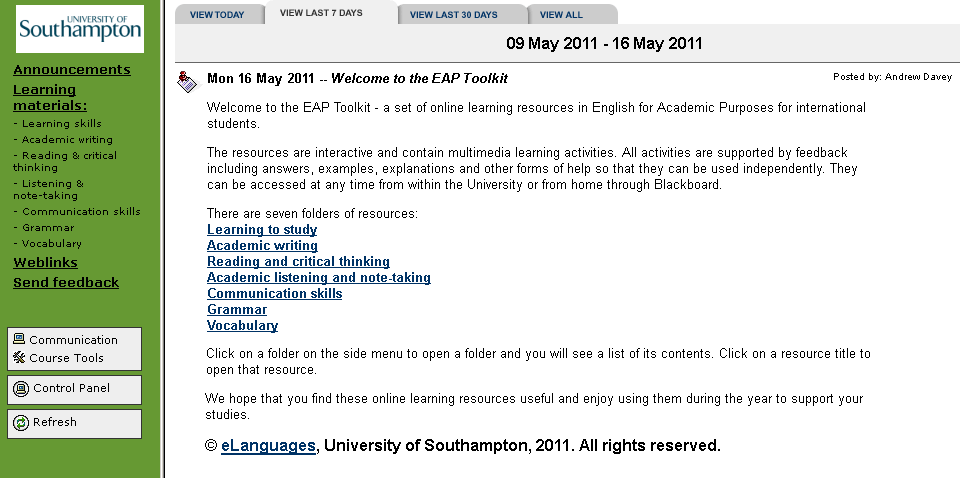
Figure 1a-1: Blackboard 8 version of the homepage
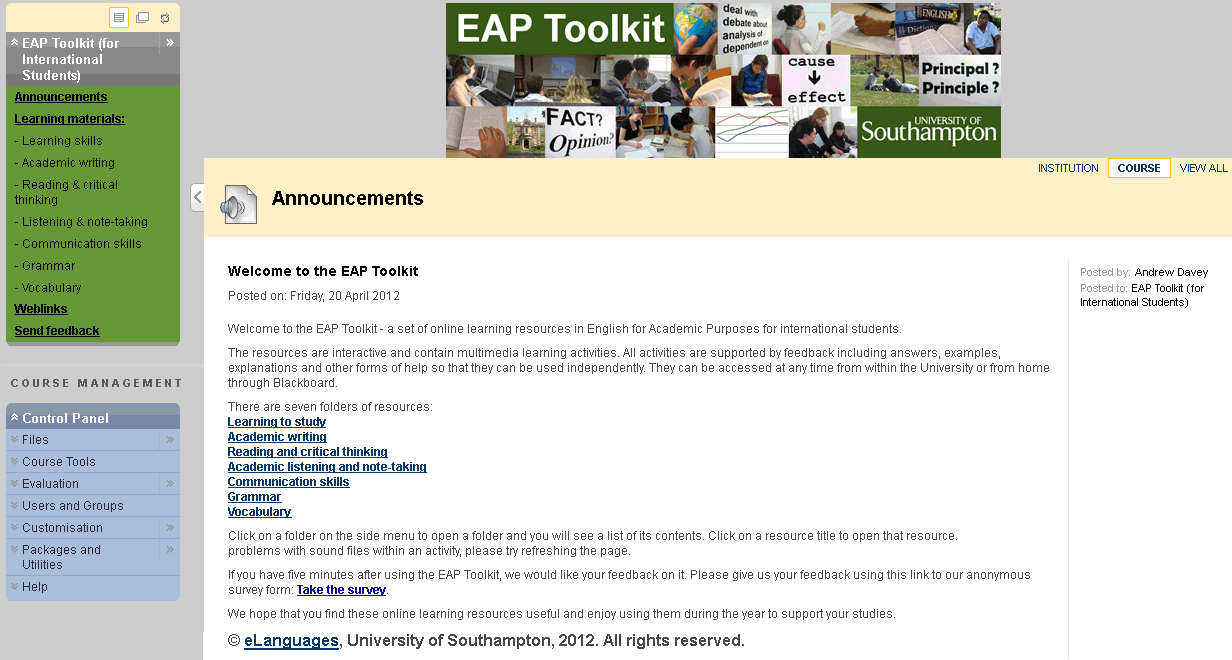
Figure 1a-2: Blackboard 9 version of the homepage
The next two screenshots show the content folders on Blackboard 8 and Blackboard 9. These presented the biggest challenges, as due to naming and conding restrictions a different approach had to be taken. Significant experimentation was required as the previous system for uploading learning objects as attached zip files which opened on an HTML page no longer worked. Instead, I had to adapt the system to use the main Blackboard files in a specific folder, and then create links to the HTML pages. Although this does produce a cleaner output (there is no reference to a 'package file'), the new approach carries a risk that if Blackboard systems are updated then the link may no longer work. The only way to mitigate this is to check every time Blackboard is updated, and I am in regular contact with the Blackboard/MLE team at the University to ensure that this does not present any problems.
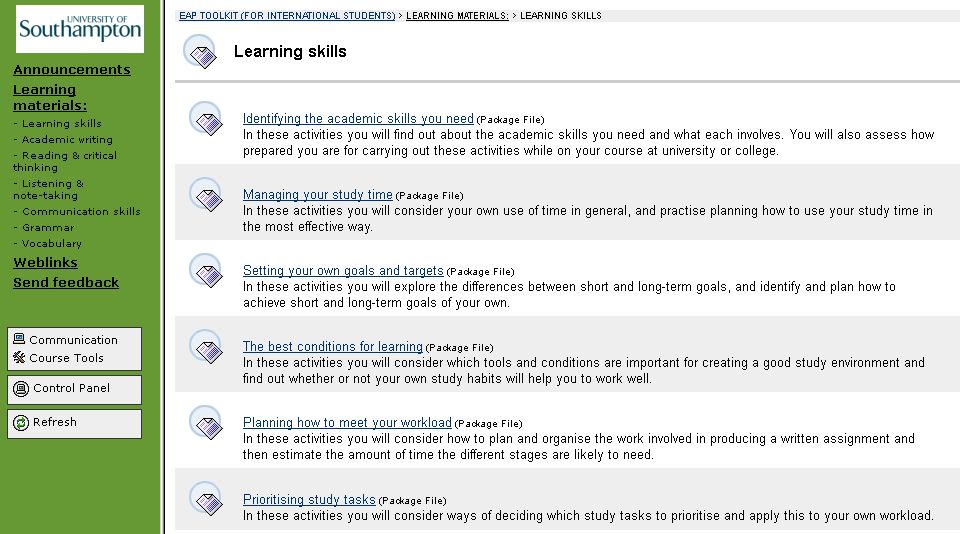
Figure 1a-3: Blackboard 8 version of folder contents
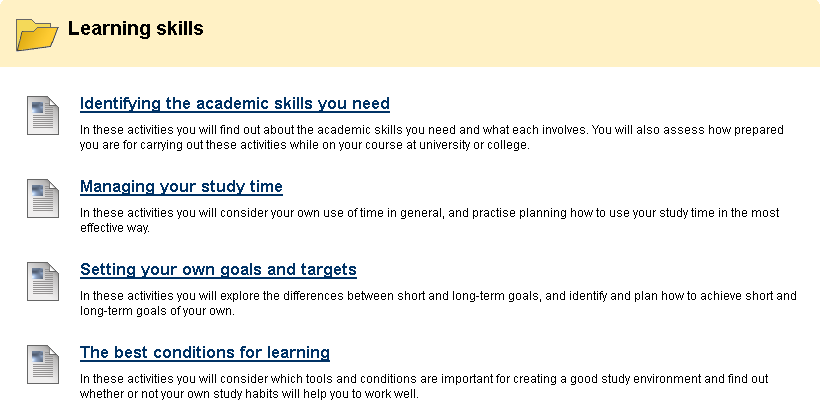
Figure 1a-4: Blackboard 9 version of folder contents