Applicant details
Andrew Davey
eLanguages Products and Projects Manager and Learning Technologist
Modern Languages and Linguistics
Faculty of Arts and Humanities
Avenue Campus
University of Southampton
Highfield
Southampton
SO17 1BJ
A.Davey@soton.ac.uk
023 8059 9604
https://www.soton.ac.uk/ml/about/staff/ad2e06.page
2017-18 update
This is an updated version of my original 2014 portfolio. The additional section can be found in my 2017-18 portfolio update.
Background
I've been working in learning technology since early 2007, when I started working for eLanguages whilst studying for my degree. Although I was originally hired to design a website (something I had worked on since 1999 when I was still at school), I have broadened my scope in recent years to include greater levels of student engagement and a broader range of technologies.
My decision to apply for CMALT status comes with a desire to develop my career and to gain a widely-recognised form of certification to aid my professional development.
Computing Qualifications
BSc (Hons) Information Technology in Organisations from the University of Southampton (2009, 2:1)
A-Level Information and Communication Technology (2003, Grade A)
GCSE Information Technology (2001, Grade A)
2017-18 portfolio update
Summary of recent work/practice
I have taken on a more senior role within eLanguages since 2014, progressing from Projects Officer to eLanguages Products and Projects Manager and Learning Technologist. This has enabled me to take a broader contextual view of my development work, and take on a more strategic role with existing projects, new projects and broadening the use of learning technology throughout the department. I feel that my experience in this time has helped me to network with colleagues both within and external to the University and has equipped me for higher-level positions in the future.
Overview of CPD activities over the past 3 years
ALT conference 2015 - Manchester
Description: Due to illness I was promoted from co-presenter to lead presenter in the week of the conference, taking over the session "The international student community as agent of change in online course design." The presentation was a subject matter I was confident with - Get Ready for Southampton - a project I have been involved with since its adaptation from Arrive UK in 2011. I was involved in both the running and social tutoring of Arrive UK for several years, which gave me a good background in the needs of international students coming to the UK to study.
Reflection: I felt that the presentation went well, and I received positive feedback from attendees. I really enjoyed leading the presentation and felt that I made a positive contribution to the conference. I felt that because I knew the content well, I was able to step up to lead and adapt the presentation confidently.
Evidence: Details of the presentation at ALT-C 2015.
Solent Learning and Teaching Community Conference 2016
Description: Secrets of the Masters: advancing and enhancing an online MA, presented at the Solent Learning and Teaching Community Conference in 2016.
Reflection: This presentation was an opportunity to both reflect on the course and disseminiate our reseach findings. I found it a useful collaborative task putting the presentation together and finding out what colleagues thought were the key points about the course. The presentation was a Pecha Kucha - something neither I nor my co-presenter had previously attempted, but it proved to be a good format, and one which I also used at the 2018 running of the conference.
Evidence: SLTCC 2016 programme
SLTCC 2016 abstracts
CPD3: ILTeR (Introduction to Learning and Teaching for Researchers)
Description: This course provided me with an opportunity to reflect on my own teaching and learning strategies.
Reflection: I was pleasantly surprised at how much of the course material I was already aware of, and used this to deepen my understanding of teaching and learning strategies. I discovered several things that have enhanced sessions that I run, including integrating a wider variety of learning styles.
Updated future plans
Now that I have settled in to project and product management, I am now looking to develop my role to progress and take on broader responsibilities managing learning and teaching products and staff across the Faculty or University. I am continuing to develop the online resources and projects that I manage and want to focus on the most successful approaches. I also want to broaden my enterprise management, working on more products which can be licensed to other institutions, effectively both paying for themselves and being cheaper for the other parties than having them develop their own.
1a. Operational Issues: An understanding of the constraints and benefits of different technology
Details
Requirement: An understanding of the constraints and benefits of different technology
You should show how you have used technology appropriately, given the constraints and benefits it provides within your context.
Evidence in support of such statements might include a brief commentary on the choices behind the development and use of learning technology that influence its fitness for purpose. (This might discuss issues as viability, sustainability, scalability, interoperability and value for money.) You may already have something like this in the form of a design outline, proposal, conference presentation or similar. You should include such existing documentation wherever it seems relevant. Alternatively, you might want to take this opportunity to find out more about a technology you have deployed and produce a report on its viability.
Description and reflection
Limitations and problems relating to Blackboard as a VLE at the University of Southampton.
The University of Southampton has used Blackboard as its institutional VLE of choice for over a decade. During this time I have used it as both a student and as a content and course builder. I've found a number of issues with this, and had to perform creative workarounds to try to compensate for changes and limitations.
Within my team, our main usage of Blackboard is maintenance of our online learning toolkits (sets of interactive learning objects in study skills). We have developed these to be interoperable (on Blackboard, Moodle and free-standing on a hosted website). As a result of this, extra steps are required to arrange the resources on each environment. I try to make the packages require minimal effort to be customised to each of these platforms, both to save work for myself and to provide a better service to other institutions who license the toolkits.
One aspect of this I have found particularly frustrating is that each upgrade to Blackboard presents new obstacles and challenges. The biggest problem of these was the change between versions 8 and 9 which meant that formatting could no longer be applied to descriptions of uploaded files. In a further upgrade, from 9.0 to 9.1, even HTML elements such as ' ' could no longer be used.
Although this was initially problematic, I found a solution to the problem by adapting the menu system of the web-based versions of the toolkits and uploading those to Blackboard. Although this proved to be a very repetitive task (I had to set up all the links to the individual items in the Toolkit) I was satisfied with the results, and now the system should require minimal maintenance. A side-benefit of this is that I was also able to compile a list of direct links to each of the items, which can now be used within the University for anyone else to link to the items. I also feel that the bespoke menu system provides a superior environment for the users, as it is more graphically-based (the original version only included the default Blackboard file images and text).
One of the main limitations of Blackboard is the increasing number of restrictions that seem to be placed on materials for teaching staff who don't have administrative access and advanced technical skills. These restrictions, such as the inability to enter even simple HTML formatting in most locations, often put teachers off when it comes to developing more sophisticated materials. This also makes it difficult to integrate resources which are generated by proprietary or bespoke sources rather than those developed with Blackboard's own tools.
There are, of course, a number of benefits to using Blackboard. On a personal level, familiarity with two VLEs enables me to provide support across other universities using our resources. Blackboard also provides an excellent environment for courses based on simpler resource sets, and those produced by less (technically) experienced staff. One other benefit is enrolment - at Southampton, all students are automatically enrolled on our resource sets as soon as they create their University accounts, saving any need to manually upload over 5000 accounts each year.
I feel that solving some of the challenges presented by Blackboard upgrades have enabled me to use my own initiative and problem-solving skills to perform tasks that are not otherwise supported through official channels.
We also use Moodle for the delivery of some courses, in particular our Online MA in ELT, Get Ready for Southampton and Presessional online courses. These all present different, specific requirements which prevent the use of Blackboard for these courses. For all three, students may enter before they have a University computing account. Without such an account, they cannot access Blackboard, but Moodle allows for any student to use their own email address without the need for specific guest accounts. Additionally, in the case of Get Ready for Southampton, the environment requires a level of customisation which requires a separate installation of Moodle with no other courses. Creating a second Blackboard installation was deemed unviable for cost reasons, as well as due to the proprietary nature of the code preventing the required customisation. As a team, we also felt that the learning design structure had more to offer students on pre-arrival (or even pre-application) courses, due to the flatter structure of Moodle courses.
Evidence
Here are several screenshots of how the toolkit folders are set up in Blackboard. I've taken these from two of the installation guides I have written for the Toolkits, to illustrate the differences between versions 8 and 9.
The first two screenshots show the Toolkit homepage on Blackboard 8 and on Blackboard 9. This was one of the easiest parts to transition to a new format, but care had to be taken about the width of the menu as this is user-customisable.
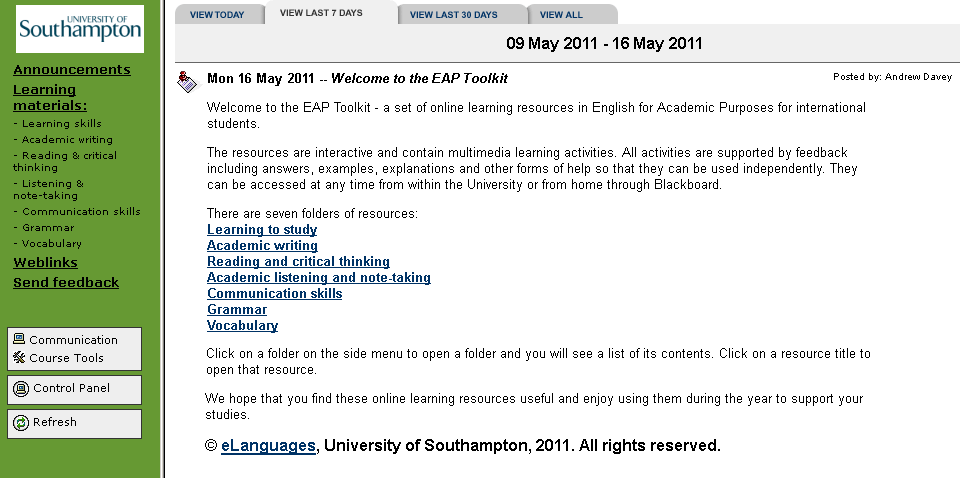
Figure 1a-1: Blackboard 8 version of the homepage
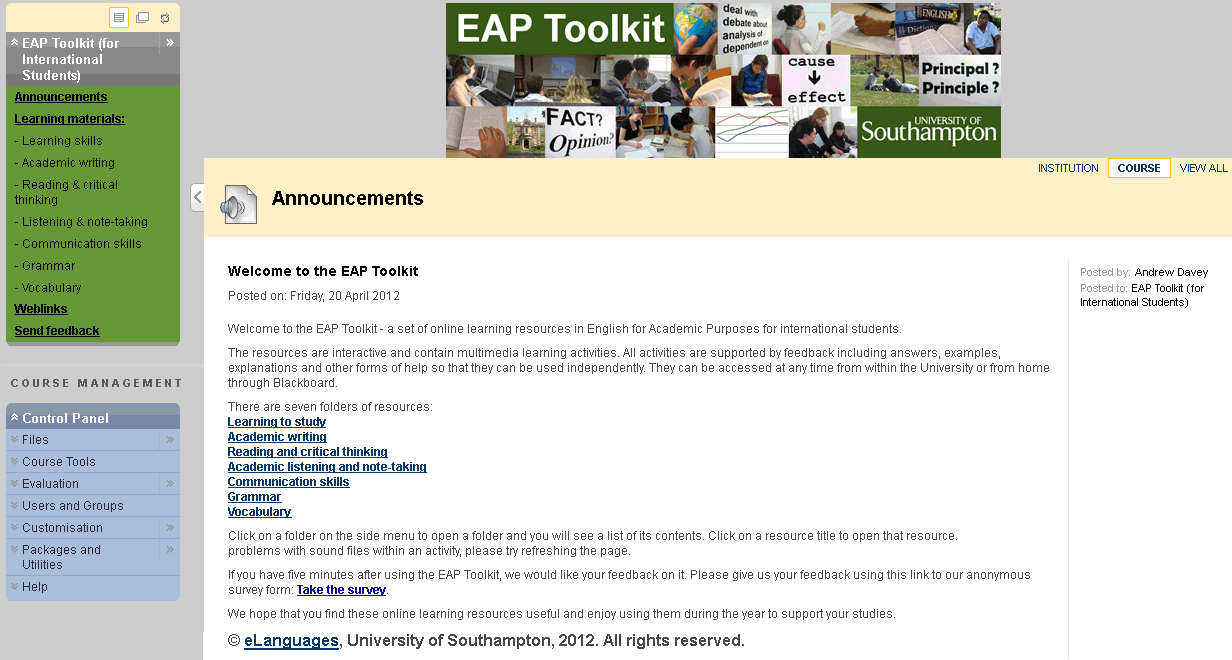
Figure 1a-2: Blackboard 9 version of the homepage
The next two screenshots show the content folders on Blackboard 8 and Blackboard 9. These presented the biggest challenges, as due to naming and conding restrictions a different approach had to be taken. Significant experimentation was required as the previous system for uploading learning objects as attached zip files which opened on an HTML page no longer worked. Instead, I had to adapt the system to use the main Blackboard files in a specific folder, and then create links to the HTML pages. Although this does produce a cleaner output (there is no reference to a 'package file'), the new approach carries a risk that if Blackboard systems are updated then the link may no longer work. The only way to mitigate this is to check every time Blackboard is updated, and I am in regular contact with the Blackboard/MLE team at the University to ensure that this does not present any problems.
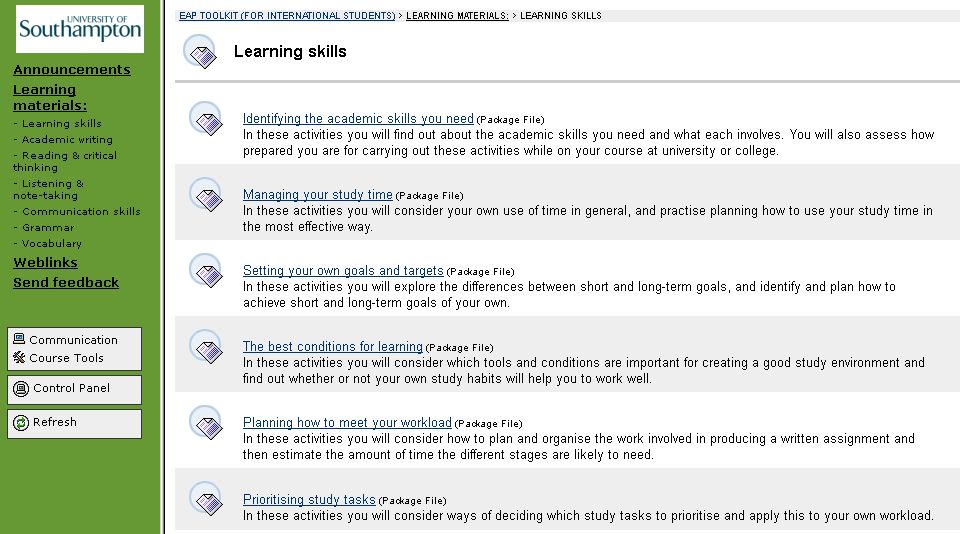
Figure 1a-3: Blackboard 8 version of folder contents
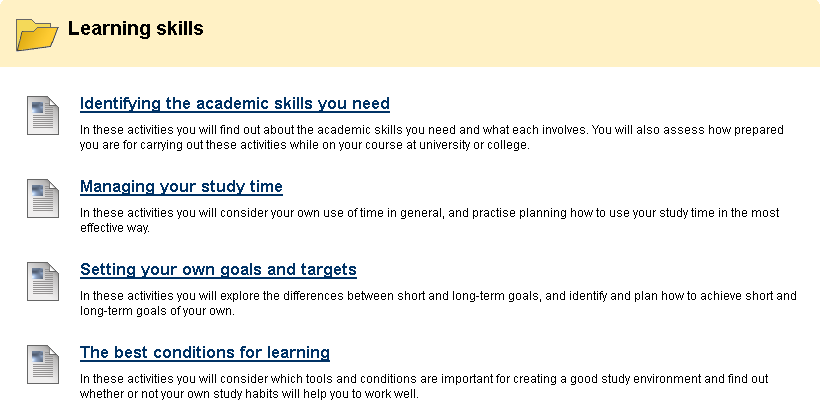
Figure 1a-4: Blackboard 9 version of folder contents
1b. Operational Issues: Technical knowledge and ability in the use of learning technology
Details
Requirement: Technical knowledge and ability in the use of learning technology
You should show that you have used a range of learning technologies. These might include web pages, PowerPoint, Virtual Learning Environments, Computer-Aided Assessment, programming languages and so on.
Evidence might include copies of certificates (originals not needed) from relevant training courses, screenshots of your work, a note from academic or support staff who have worked with you or, if appropriate, confirmation that the work is your own from your line manager.
Description and reflection
I have been responsible for the development of several different customised offline versions of our in-house learning object creation (LOC) Tool. I had to add a number of features for colleagues within Modern Languages and Linguistics, such as Asian language support. I also had to design a new set of stylesheets for use by colleagues I work closely with. My latest developments on the tool have involved HTML5 activities being coded directly within the Tool - matching exercises and drag-and-drop tasks had previously required Flash. This latest development was in response to both the problems faced due to certain companies removing support for Flash and the need for greater accessibility for users. However, due to the nature of some of the learning objects we produce I had to provide significant backwards compatibility (back to Internet Explorer 6).
The LOC Tool was originally developed in collaboration with LLAS, who have developed an online version of the Tool. Although my primary focus has been on the offline version, I also provided support for debugging the online version.
Developing the Tool has provided me with experience of rapid, agile development to provide end-users with the required functionality. It has also enhanced my user interface development skills, allowing me to see the application deployed and in use. Teacher users report technical issues when they arise, and when this happens I make changes as quickly as possible. In this way the tool is continually being developed, and I learn in the process.
Evidence
One particular feature I added to the tool was a new 'dropdown gapfill' task type. This allows the developer to add one or more dropdown lists within a sentence, paragraph or other text, selecting from a user-defined list of options. This is an improvement as the only previous options were to have a dropdown list on the line after the text, or to have a gapfill where the user had to manually type answers from a list.
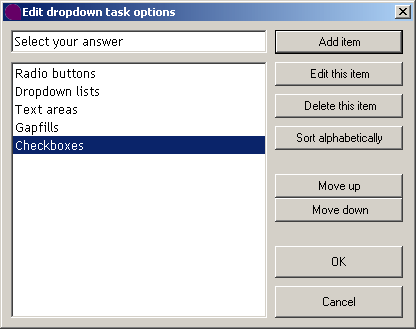
Figure 1b-1: Dropdown list options page
The following samples from the EAP Toolkit and the Study Skills Toolkit were also developed using the offline version of the Tool. These samples demonstrate the new HTML5 and Javascript-based features of the LOC Tool:
Practising listening skills for lectures
Introduction to describing graphs and tables
Using paraphrase in writing
Managing your study time
1c. Operational Issues: Supporting the deployment of learning technologies
Details
Requirement: Supporting the deployment of learning technologies
Statements about your involvement in supporting the deployment of learning technology might relate to providing technical and/or pedagogic support to teachers, advising on (or re-designing to take account of) technical and usability issues, developing strategies or policies, managing change, providing training or other forms of professional development, securing or deploying dedicated funding and so on, all within the context of the educational use of learning technology.
For evidence, you might include the overview section of a strategy document, meeting minutes, summaries of student feedback, testimonials or witness statements from other colleagues, for example.
Description and reflection
I've supported the online environment for the University of Southampton's part-time MA in ELT: Online for the past 6 years. This has involved being the primary technical contact for both the tutors and the students on the course. I also work closely with the teacher-developers who are updating the course to ensure that they are aware of the environment they are developing for, and create more technical resources myself to provide guidance to students.
At the start of this period I only had a relatively basic knowledge of Moodle, but have since developed my knowledge and skills for both development and maintenance of the system. I have enjoyed getting to know the students through the course and being a technical contact who can help with day-to-day problems they might have with studying online from a distance (often many thousands of miles). These problems range from missing or broken links to technical issues with student hardware which can impede their learning experience.
Some of the technical issues I come across are to do with student accounts or access problems. This can often involve troubleshooting between different email providers (particularly if students have their emails forwarded to personal accounts). These are particularly urgent, as with distance students they are not able to physically visit the campus, and the University's technical support services (iSolutions) operate phones at times which do not work well for students in very different timezones. Therefore, email support is often the only available option, and it is crucial that they can receive and read emails regarding the course.
I am also responsible for the day-to-day running of the course on a custom Moodle platform. The course currently has over 40 participants and I provide a first point of contact for any technical issues that they or the online tutors might have.
As well as the Online MA, the environment also hosts a shared space for the University's Modern Languages and Linguistics Distance PhD students. These students come to the University for their inductions, and part of this process includes a training session which I run. This is both to familiarise the students with the Moodle environment and to allow them to set up their own laptops to use VPN-based resources.
Evidence
"The students were also able to communicate directly with an educational technologist [myself] at the University who provided technical support to smooth socialisation into the e-learning community." (Baker and Watson, 2013:6)
Baker, W. and Watson, J. (2013). Mastering the online Master's: developing and delivering an online MA through a dialogic based framework. Innovations in Education and Teaching International, pp.1-14.
"Regarding the staff involved in the module...I have to acknowledge the prompt and helpful support I always received from the eLanguages Projects [Officer]." - Quote from student on the MA in ELT: Online.
"Hi Andrew, I think I finally sorted this out! Apparently it is a send-receive account now, I hope everything is back to normal now! Thank you for all your help!" - Quote from student on the MA in ELT: Online.
2a. Teaching, Learning and / or assessment processes: An understanding of teaching, learning and/or assessment processes
Details
Requirement: An understanding of teaching, learning and/or assessment processes
Statements here might relate to areas such as teaching experience, learning design, curriculum development, work-based assessment, the creation and execution of a programme of training and so on.
Evidence might include being on the register of the Higher Education Academy, a PGCE award, having completed a SEDA-approved course or undertaken relevant sections of the FERL Practitioners Programme or Certified E-Learning Professional courses. Commentaries from peers on your approach would also provide suitable evidence. Other possibilities include teaching experience, reflective statements that analyse experience in terms of learning theory, pedagogic approaches, sociological theories, or a comparable, recognised perspective. In relation to learning design, a report, specification or reflective statement might be provided that clearly elaborates the principles that informed the design process. In any collection of evidence there should be some consideration of how technology is changing approaches to teaching and learning and/or the roles of learners, teachers and support staff.
Description and reflection
I have twice led training sessions in the use of Audacity for research purposes in the University's Masters Programme in Applied Linguistics on the University's Research Skills for the Dissertation module. The module co-ordinator was consistently positive about my training and reported good feedback from the students.
My training sessions consisted of a brief introduction, followed by getting the students logged into the workstations and starting Audacity. I then demonstrated the basic features of the software, along with more advanced functionality. Throughout the sessions I allowed plenty of time for students to try different simple tasks to give them 'hands-on' experience. During the sessions I kept to a relatively fluid plan, as I knew that there would be a wide variety of students with differing abilities. I allowed plenty of time for what some students find simple to allow for those new to Audacity, or who had little experience of the technology, not to get left behind.
I also tailored the session to include functions which are particularly useful when transcribing interviews - something that many (if not all) of the students on the programme had to do. The second running of the session was built on the first session a year earlier - I felt that although the first session had run smoothly, there were more details about transcription-related tasks that I decided to build into the session rather than relying on students to ask for them.
I allowed time for questions at various points in the sessions, and toured the classroom myself to answer any questions the students had, and to try to overcome any specific teething issues. Audacity is automatically available on University computers which helped to reduce the setup time, but also meant that I had to provide a reference sheet for students wishing to download the software onto their own computers. This itself added a complication factor - having tested the download links the week before the session, I had to make a change on the day before as one of the links had changed. This highlighted to me the importance of checking links and functionality as close to a session as possible, as well as allowing time to make changes. I also provided the handout online after the session rather than before, to ensure that students had the most current version.
Evidence
Andrew Davey has contributed on a number of occasions to the teaching of the 'Research and Enquiry 2' module as part of the MA programmes in Applied Linguistics and Language Teaching at the University of Southampton. Specifically he has led the sessions on using Audacity to edit audio recordings used in research. On all occasions he has demonstrated a professional and thorough approach to teaching. He has been well-prepared for the sessions, offered useful and clear explanations to the students and been approachable and adaptable in responding to students' questions and problems in the practical activities during the sessions.
- Dr Will Baker, Research and Enquiry 2 module convenor
Here is the handout from one of the sessions.
2b. Teaching, Learning and / or assessment processes: An understanding of your target learners
Details
Requirement: An understanding of your target learners
Statements should how you have found out about learners' needs and the context for their studies, and how you have developed inclusive, accessible and learner-centred approaches that reflect this.
Evidence might include a description of how assistive technologies have been used to support disabled students, how learner feedback has influenced the design of a portfolio, how the needs of work-based learners or overseas students have shaped the curriculum, or records of conversations with product analysts, marketing departments or course teams and the resulting plans for your design. Evidence of changed practice, rather than simply the recognition that this is an important area, is required.
Description and reflection
Context: international students
I have worked with and developed for international students for most of my career. This can sometimes create problems with intercultural communication, particularly in online environments where email is often the only easily available form of communication. Presentation is also a key element I focus on, trying to ensure (where possible) that graphical elements are universal and support any text.
The majority of the international students I come into contact with have English as a second language. Because of this, I also try to avoid using idioms and overly technical language (especially as it does not often easily translate). Where I feel that a student may not have understood me, I try to rephrase what I say into simpler English where possible to increase their comprehension.
Another area I have concentrated on is slower speech. When training international students, I make an effort to speak more slowly to get my points across more clearly. I feel that I have made good progress on this. If I ever make a recording that I feel is too fast but is otherwise correct, I use suitable functionality in Audacity to slow the recording down.
From when I was a student I spent a lot of time with international students outside of work as well. I was heavily involved in the Christian Union's International Café and a church International Alpha course, which I greatly enjoyed. These both provided me with a good chance to get to know international students in a different context, and find out more about a broader range of their needs, such as the tendency for some students to drop everything non-academic near exams and coursework deadlines. This has increased my intercultural awareness and made me better equipped to understand international pastoral issues.
I also try to adapt courses to ensure that all students start on as level a playing field as possible. Our international students come from a wide variety of backgrounds, particularly regarding e-learning experience. Some have completed online courses, whilst others have barely used anything. There is also the issue with the accessibility of social media - some predominantly Western sites such as Facebook, Twitter and YouTube are inaccessible (at least via 'official' means) from some countries such as China. I try to ensure that such social networks are not core to any courses or resources, so that students who cannot access them are not disadvantaged.
Likewise, something which has increased dramatically over the past 18 months has been the prevalence of devices, such as many tablets and phones, which do not support Flash. I try to ensure a uniform experience across devices, and have adapted our resources over time to suit. For example, Quicktime MP3 embedding with a Windows Media Player fallback within web resources was my method of choice from 2007-2008, but as we expanded our provision of videos it became clear that container issues meant that Flash was a more suitable solution, using Quicktime/Media Player as a fallback option. In the last 18 months, however, I have adapted resources again to make HTML5 video and audio formats the default option where supported. Flash is now a backup option, with Quicktime/Media Player as a last resource for those who cannot use HTML5 or Flash. I feel that this change was particularly important for international students as they are often the first to adopt new mobile technologies.
Evidence
As a member of the eLanguages team in the department of Modern Languages and Linguistics, Andrew is regularly put in contact with international learners both face-to-face and through his work in online developments. A number of our online courses and resources are aimed directly at non-native speakers of English and delivered to them in widespread locations overseas where software choices and connectivity levels may vary. Andrew is extremely diligent in ensuring that full usability testing is conducted and that international learners experience no disadvantage when engaging with our resources or courses. He has been proactive in identifying technical changes (e.g. Flash to HTML5) that need to be made to meet the changing habits of users, teaching himself the necessary skills and implementing such changes. Through his close work with other team members and groups of international learners studying in the department, he has shown himself to be adaptive to the needs of such learners, and has become well informed and practised in working with them both inside and outside the classroom.
- Julie Watson, SFHEA, Head of eLanguages and Principal Teaching Fellow in e-Learning, Modern Languages and Linguistics, University of Southampton
3. The wider context: Understanding and engaging with legislation, policies and standards
Details
Requirement: Understanding and engaging with legislation, policies and standards
Statements here should show how relevant legislation, policies, strategies, technical standards, professional/research codes of practice and so on have influenced your work. You are not expected to have expert knowledge of all of these areas, but are expected to be aware of how they relate to your current practice. Relevant legislation is likely to include special educational needs/accessibility, discrimination, copyright and intellectual property, data protection and privacy issues.
The kinds of evidence that would support this would include minutes of meetings with legal advisers, documentation showing how legal issues have influenced work (such as reports or data protection forms), justifications for modifications to a course to reflect new policies or a record of how technical standards have been taken into account during system development.
Description and reflection
I recently undertook a project to improve the accessibility of many of the resources that my team develop and maintain to bring them more in line with Web Content Accessibility Guidelines (WCAG). In previous projects we had used Flash for most of our interactive activities, with plain text-based 'accessible' versions for users with restricted visibility or dexterity. However, we felt that, particularly with issues surrounding Flash and mobile devices, this would be a good opportunity to merge the standard and accessible versions, to improve the user experience and to meet accessibility guidelines.
The project involved developing a new set of templates which mimic the core features of the Flash activities such as matching and drag-and-drop exercises using HTML5 and JavaScript. After developing the templates, the first resources I converted were those in Prepare for Success, which is a resource we have produced for international students.
Prepare for Success is a UKCISA-funded website, currently in the seventh phase since its inception in 2008. The site aims to prepare international students from all over the world for studying at a UK university or FE institution. I have been the technical lead on the project since the beginning, taking responsibility for the website (except for a brief outsourcing period in 2009) and the structure throughout.
Because of the broad user base of the website (and our other resources), I needed to ensure compatibility with a wide range of browsers, from Internet Explorer 6 (and browsers of a similar age) upwards, as well as touchscreen devices. This proved to be a major challenge, and I had to learn about website touch events and how to apply them to web pages. The activities also required keyboard functionality (for those who could not use a mouse or touchscreen). Although I was able to achieve this, it was a complex task and I had to make adaptations for older browsers as well. For example, all mainstream browsers except Internet Explorer 8 and below support HTML5, so for those browsers users have to see Flash videos and audios (if they have Flash installed) or otherwise they get a Windows Media Player or QuickTime Player. I felt this was the best compromise.
As part of this testing process, we enlisted the help of a PhD student who himself is partially sighted, and is researching accessibility. His feedback was invaluable and alerted me to a number of minor changes which were needed to provide a better user experience.
I was very pleased with the improvements to the site, both from the perspective of increased usability and the reduction in maintenance that the changes have indirectly brought. As with any website, there is still scope for improvement, and the next phase will include the addition of a blog. This will present new challenges as I learn more detail about how to set up and customise Wordpress on a server.
Evidence
The converted resources are available at https://www.prepareforsuccess.org.uk and have undergone extensive usability testing. The new version received positive feedback in accessibility testing, and I made some further modifications to some of the code in response to some of the feedback.
4. Communication: Working with others
Details
Requirement: Working with others
Statements should describe the way in which your work involves collaboration, for example through participation in a team or acting as an interface to other groups.
Relevant evidence would include reflection on collaborations with others, reports outlining your activity within a team process, how you have brokered support for a particular initiative (for example from a technical or legal support service) or how you have worked with others to solve problems.
Description and reflection
I work as the learning technologist within a small production team based in Modern Languages and Linguistics. We have a variety of different development processes which utilise the different skill sets within the team, and share a workspace on a networked drive.
One of these processes is the integrated approach that we take to the process of developing a new learning object. This collaboration involves all three of the full-time members of the team. Firstly, the teacher-developer in the team creates an outline of the activities, consulting with the rest of the team (including myself) to decide on certain elements such as task types. Secondly, the content is transferred from the template into the bespoke tool I have developed, and then passed on to the editor for a first check. Once these initial checks are completed, the learning object is passed to me for any interactive enhancement. This may take the form of an audiovisual recording, or it may involve adaptation of the content to include more advanced, HTML5-based activity types, such as drag-and-drop or matching activities. During this I also proofread the content. The learning object is then passed back to the rest of the team for checking, and then I create a final version. Depending on the course, I may then zip and upload the learning object to the appropriate platform.
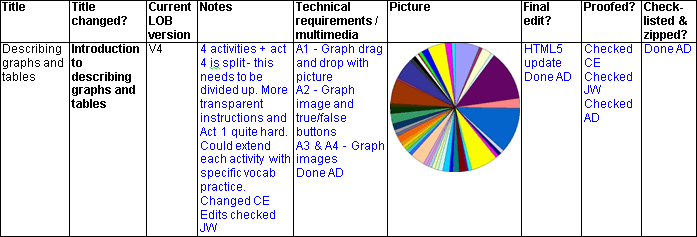
Throughout this process, a progress sheet is kept and used by the whole team to keep track of progress of each learning object. Additionally, we all update the version number and archive old versions as we go, allowing us to restore an older version in case of problems or needing to revert back. As a team we also meet regularly to discuss any issues that have arisen from the development. For example, if a problem with the development tool caused it to crash, I would then study the crash data to find the source of the problem, attempt to fix it and then recirculate an updated version of the tool to the rest of the team.
There are occasional miscommunications, for example if someone in the team forgets to mark on the progress sheet that their phase is complete, but this is easily dealt with, normally just with a face-to-face question. This is especially convenient as the team is based in a single office.
I find the development and production process both enjoyable and rewarding as I like being involved in different aspects of the development, and being able to work in a team environment. I also enjoy the problem-solving aspect of the work, for example, when there is a problem with a task I enjoy being able to make suggestions about how to change it to fulfil the requirements.
Evidence
Extract from EAP Toolkit progress sheet:
5. Specialist area: A bespoke online self-test system for students
Details
Requirement: As well as the core areas, Candidates are required to demonstrate evidence of independent practice in one or more specialist options. This reflects the fact that, although there are common areas of work in this area, practice is extremely diverse and everyone specialises in something different.
Your chosen specialist option might be defined by your manager, your professional body or your own personal interests. You can also define your own specialist topics if none of the recommendations here reflect your role and interests. However, when doing this, you should keep in mind that such areas should be specialist - that is, they should not be things that the majority of practitioners in this area would do.
Once the specialism has been chosen, evidence could include: Reports, papers or presentations you have written; a job description plus written statements supporting your specialist knowledge from colleagues, clients or managers; active membership of professional or other bodies; certificates of completion of specialist training programmes or courses.
Description and reflection
In this section I will reflect on the process of creating a bespoke self-test system for students, which ties in with my specialist areas of testing systems and learning object creation and development. I have been developing this new system for students to use when reviewing packaged sets of learning objects (toolkits) on a particular topic. This system, which is still a work-in-progress, will be included with the individual online toolkits as a core feature of each package.
We held a team planning meeting to outline the requirements for the system, and I started by putting together an experimental alpha version. This used basic styling (based on the learning objects within the packages) for ease of access, and a simple set of 10 multiple-choice questions built in HTML. One particular point I had to bear in mind was that the testing system is going to be hosted online, and any users who have answered some questions but have a connection or computer failure should be able to resume from where they left off. Ultimately, I intend to make this a part of a database system; however for the initial development and testing phase I felt it would be a more agile development to rely on browser cookies to store this information.
Once I was happy with the functionality of the code and the basis of the presentation I ran it past the rest of the team to check for any functional or user issues. In December, we conducted a piloting session with a group of 25 Masters students who are studying English Language testing, giving them time to read through the content of the package before embarking on the test.
Their overall feedback on the system and the concepts behind it were positive, but there were some limitations which were apparent. The most significant complaint was that the user interface looked dull and dated. I felt a little disappointed by this, as the students knew it wasn't a final version, but in the feedback meeting we held it was decided that a more graphical approach was required. This is a particular challenge because there are few interesting ways to illustrate a vocabulary test. However, I have experimented with different designs to add more visual interest, ready for a second pilot to run at the start of May.
The main advantages of developing a bespoke quiz system are the ability to customise and the ability to integrate the system with a database. Although I have not done this with the current version yet, the final version will be integrated in such a way to keep students' scores linked with the activities they have completed.
I also needed a system that could be developed independently and was not tied to a separate login system. This was the main disadvantage of the alternative route of using Moodle quizzes - the platform requires a login and integrating the existing login system with Moodle would have been both complex and potentially problematic (especially when Moodle upgrades are released, as each version would require testing). I also felt that this would have been a bloated solution, whilst a custom quiz system is more streamlined.
The self-test encapsulates some of the options within Moodle that I felt were advantageous, such as the ability to deduct marks after multiple attempts at a question, but in a more versatile way. For example, in the self-test, the scoring scale is 10/10 for a first attempt, 5/10 for a second attempt, 2/10 for a third attempt and 0/10 for a fourth attempt.
Evidence
Here are several screenshots of how I adapted the quiz system to fit the feedback from the students.
The first two screenshots show the first page of the quiz, where the student arrives when first starting. One of the issues that was raised in testing was that there was no proper introduction to the quiz. Having this 'splash screen' rather than jumping straight into text is an upgrade to solve this issue.
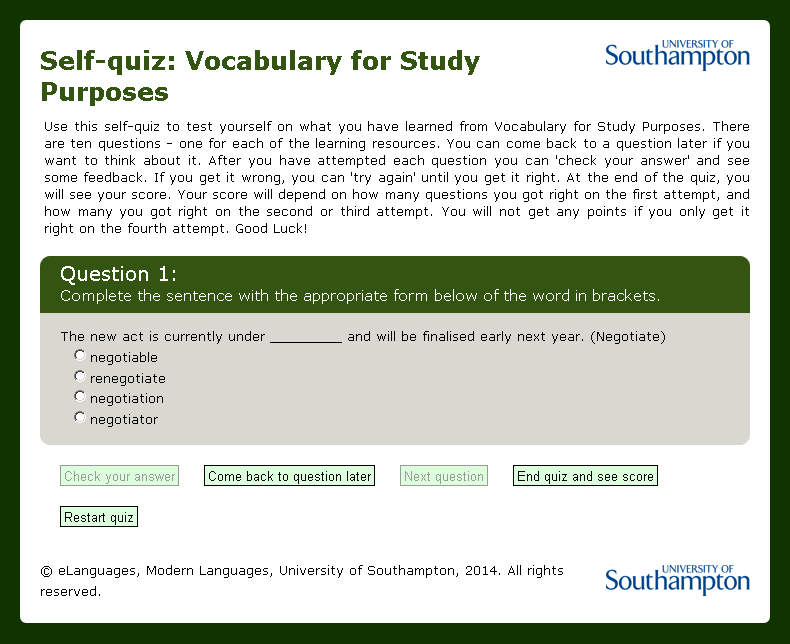
Figure 5-1: Original version of the first page of the quiz
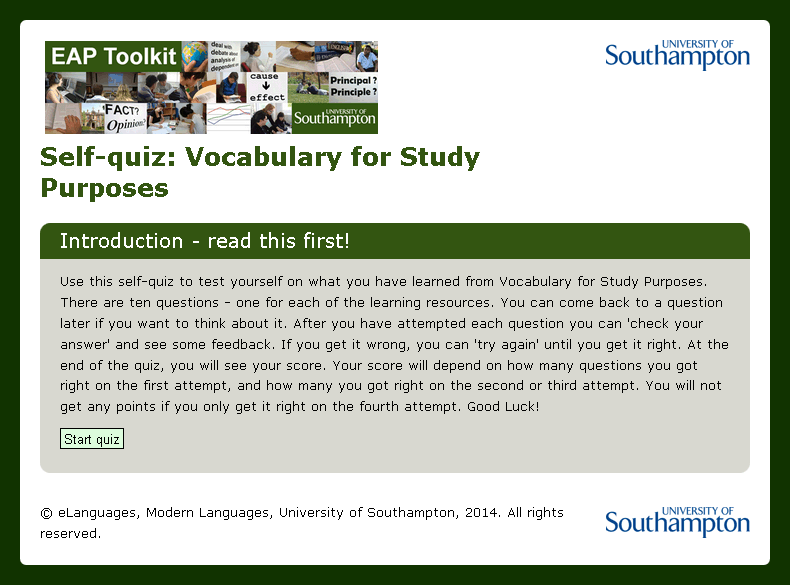
Figure 5-2: Updated version of the first page of the quiz
The next two screenshots show the student view of the quiz after entering a correct answer and checking the feedback. The main changes are that the introductory paragraph has been removed from every page as it was deemed too text-heavy, while the image has been added to make the quiz more attractive. Two other changes have made as well - the background of the tick has been adapted to fit the background of the activity, and the answer has been expanded to provide additional feedback to the student, as well as to make the fact that the answer is correct more obvious.
Figure 5-3: Original version of the answers to the first question of the quiz
Figure 5-4: Updated version of the answers to the first question of the quiz
The last two screenshots show the final page of the quiz, where the student arrives after answering all of the questions or ending the quiz. Students who tested the system had been unhappy that there was no feedback provided at the end of the quiz, so this update allows students to review all the answers they have given. Questions which were skipped do not show the answers, so that students can re-take the test without having seen all of the answers. The terminology on the 'restart' button has also been changed to reflect the option of starting a further attempt.
Figure 5-5: Original version of the final page of the quiz
Figure 5-6: Updated version of the final page of the quiz
Future plans
I would like to develop my skills in my current role, but to also take on additional responsibilities such as greater involvement in technical staff management. Our Online MA in English Language Teaching is experiencing significant growth through a collaboration with the British Council - we have previously only run cohorts of around 25-30, but this collaboration is expected to bring cohorts of over 100 students per year. As a result, further administrative and technical support will be required to maintain the consistently high levels of student satisfaction. I hope to be put in charge of managing this and would relish the challenge.
I want to continue to update resources as new technologies are introduced, and to improve the accessibility of all of our outputs and resources. I want to ensure a consistently good experience for both on- and off-campus students, regardless of their levels of connectivity and their own computing platforms. As part of this, I want to continue my professional development by keeping an eye on new tools, technologies and resources as they become available and widespread.
I want to take advantage of any suitable training opportunities that arise, and I can see myself in a more responsible and managerial version of my current role in the future. I also wish to continue contributing to the development of new tools and systems to ensure that our courses run smoothly and to enhance the student online learning experience.